Professionals

Your brand. Your knowledge.

Home Check measures, draws, checks and analyzes — documents carry your name, the assistant follows your school.

Scan with your phone to get Home Check.

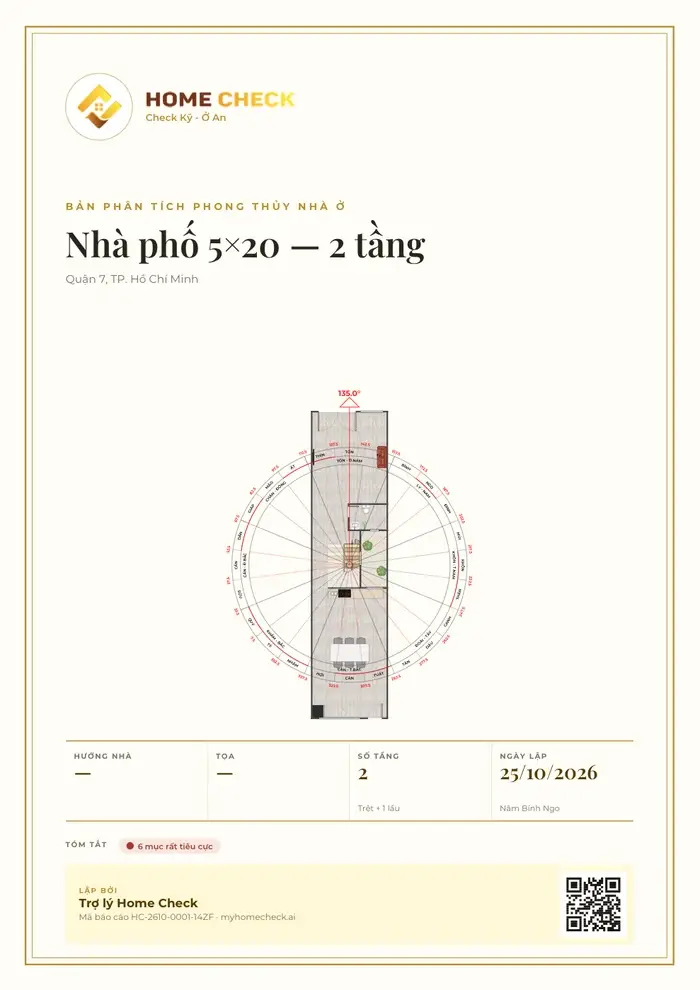
PDF cover of a feng shui analysis with logo, project name, floor plan with compass and report code.
Real screenshots from the app

Own brand · Own knowledge · PRO tier

Clients remember your name — the assistant works your way.

Clients hold documents carrying your name. The Home Check Assistant works by your school and your rules.

Your brand

PRO

One switch, and the documents carry your name.

Illustration
  • PDF cover and footer Analysis reports and A3 plans print your logo, name, representative and phone.
  • Images shared with clients The images you send carry your brand too.
  • Signature, seal, licence Sign by hand on screen; your seal and practising licence number print exactly as you enter them.
  • Your own compass ring Name it, set the degree ranges, static or dynamic by year — your school's mark on the map and the plan.

Your brand colour styles titles and rules; every export keeps a small line “Analyzed with Home Check”.
Your knowledge

PRO

Flip a switch, and the assistant follows your school.

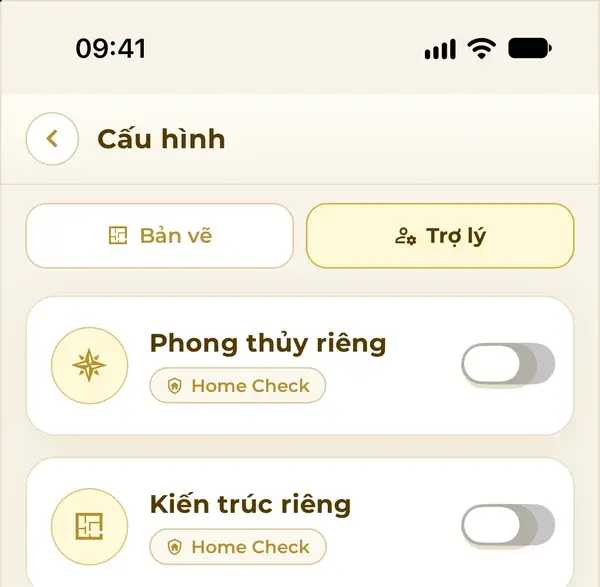
Assistant settings in the app: Custom feng shui and Custom architecture switches, with the line All projects · Building safety standards always kept.
Real app screens

Same house

  • North · Kitchen Correct
  • South · WC Wrong
  • West · Altar Correct
  • East · Bed Not settled

Feng shui · Home Check default

Correct / Wrong marked sector by sector on the plan, 9-section analysis.

Feng shui · by the set “Flying Stars — Master Minh An”

“Look at the main door first, then the stove and the bed; lay it out under the headings the master set.”

Home Check supplies the facts for each sector and marks nothing Correct / Wrong.

Architecture · Home Check default

Layouts follow the building codes and design practice of Home Check.

Architecture · by your rules

  • RequiredBedrooms at least 12 m²
  • PreferredKitchen open to the dining room
  • SuggestedAvoid long corridors

Minimum safety — structure, escape routes, local building codes — is always kept.

Illustrative example
  • Answer instructions Your school, your priorities, how you want things presented.
  • Knowledge base Notes and a few docx, pdf, txt or md files — each under 10 MB.
  • Residence or Business Each set is for one type of building.
  • Test before you switch on See your set analyze a sample house; architecture rules are read back for you to confirm.

Your knowledge stays yours

Your set is tied to your account and used by your assistant alone. Other users cannot see or use it. Switch it off to return to the Home Check default — the set is kept.

Turn on your brand

  1. Account menu → Personal brand (PRO)
  2. Add logo, name, representative, phone
  3. Save — “Use my brand” switches on by itself
  4. Export PDFs and share: documents carry your name

Install your own knowledge

  1. ⚙️ assistant → Custom feng shui or Custom architecture
  2. Create a set: building type, instructions, knowledge
  3. Test on a sample house, confirm the rules
  4. Switch on — applies to every project

Real app screens

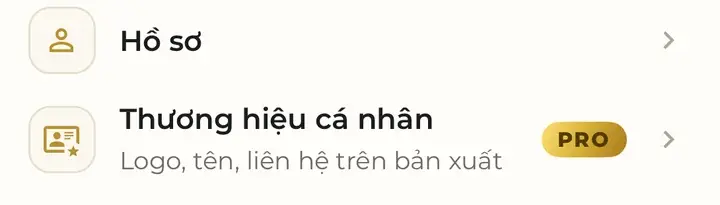
  • Account menu in the app: the Personal brand item with a PRO badge and the line logo, name, contact on exports.
    Personal brand
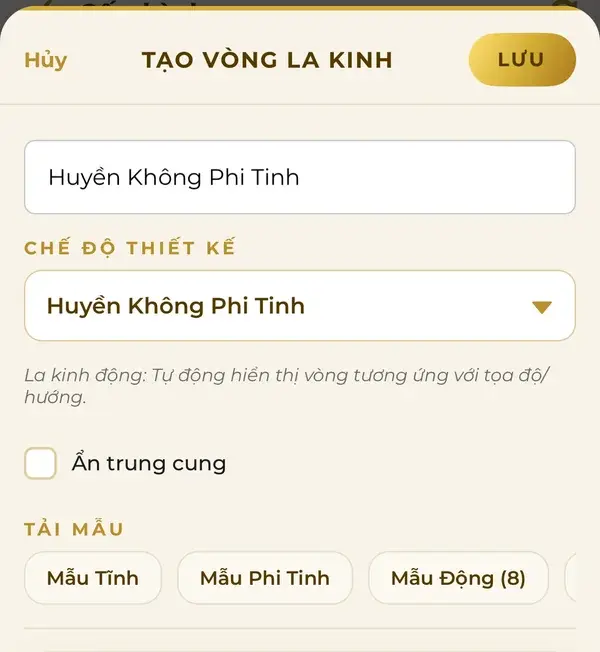
  • Create your own compass ring: name it, choose the design mode, load the Static, Flying Star or Dynamic template.
    Create a compass ring
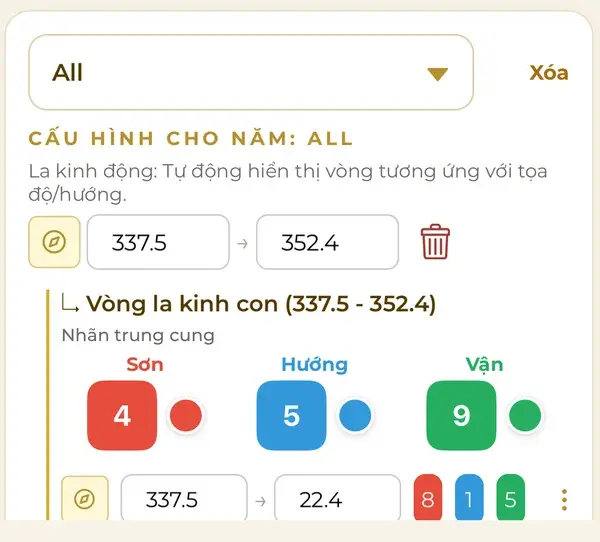
  • Setting a dynamic compass ring by year: range 337.5–352.4°, a sub-ring with Mountain, Facing and Period numbers and a colour for each cell.
    Dynamic ring by year

By profession

A toolkit for every profession.

  • Feng shui masters

    • Set polarity by exact degree on the 24-mountain compass
    • Ta Ao water method, Water Mouth and dragon veins on the map
    • Faults named down to the person: “Main door falls in the Rat-year mountain — male head of household”
    • A 9-section analysis under your name
    • Custom feng shui: the assistant analyzes by your knowledge
    See details
  • Architects

    • Three scored options within a single client meeting
    • Look up regulations with document numbers and clauses
    • Open straight in the editor to adjust, view in 3D, render
    • A3 PDFs under your brand
    • Custom architecture: the assistant designs by your own rules
    See details
  • Contractors · builders

    • Bluetooth laser meter: the plan appears as you measure
    • LiDAR scanning on iPhone and iPad models with the sensor
    • View in 3D with the owner before construction
    • Dimensioned A3 PDFs for handover
    See details
  • Brokers · real estate firms

    • Measure orientation on the spot, look up the land certificate by location
    • A quick feng shui check before presenting a property
    • Compare scores across properties and options
    • Share projects with clients by link
    See details
  • Interior designers

    • 3D object library: change sizes and materials
    • Interior renders in the style the client chooses
    • Try placing the bed, stove and altar in the right sector
    • Walk through at eye level
    See details

One session with a client

From appointment to final file — in one app.

  1. Hear the brief, relay it to the assistant
  2. Measure the site or digitize the existing home
  3. Options, check and fixes right in front of the client
  4. Share the project: view, comment, edit
  5. Send a PDF under your brand

Quick questions

How does a feng shui master put their own brand on the analysis?

On the PRO tier, open Personal brand in the account menu, add your logo, name, representative and phone (plus hand signature, seal and licence number if you like) and save. Plan PDFs, analysis reports and shared images carry your brand, with a small line “Analyzed with Home Check”. Once you reach PRO, you keep it.
Can I install my own school's feng shui knowledge in Home Check?

Yes. Open ⚙️ assistant → Custom feng shui → create a set: pick Residence or Business, write answer instructions (school, priorities, presentation), add notes and a few docx, pdf, txt or md files. Test on a sample house, then switch on: the analysis is written by your knowledge, and Home Check supplies the facts without marking anything Correct / Wrong.

Can I set my own architecture rules?

Yes. In Custom architecture, write one rule per line and mark it Required, Preferred or Suggested (for example: bedrooms at least 12 m²). The assistant reads the rules back for you to confirm. Minimum safety — structure, escape routes, local building codes — is always kept.

Is my own knowledge shared with anyone else?

No. Your set is tied to your account and used by your assistant alone; other users cannot see or use it. Switch it off to return to the Home Check default — the set is kept.

Is there a separate plan for professionals?

There's no separate plan — everyone uses Home Check the same way: pay only for what you use, with tokens.

Which building codes does Home Check follow?

The code set is chosen by the project's location, always using documents currently in force; every answer cites the document number and clause for cross-checking.

Can I work with clients and colleagues?

Yes. Invite by email or phone number and assign view, comment or edit rights, or share by link.

Put your brand on every plan

Get the app, sign in, tell the assistant what you need.

Scan with your phone to get Home Check.

Get Home Check

Scan with your phone to get Home Check.

The code opens the right store for your phone.

or

Download on the App Store Get it on Google Play

More