Home Check Assistant

Say one sentence. The Assistant does the work.

Type, tap the mic, or go Live and simply talk. The Assistant understands the task, does it right on the plan, then explains it with pictures.

Scan with your phone to get Home Check.

See Chat and Live at work
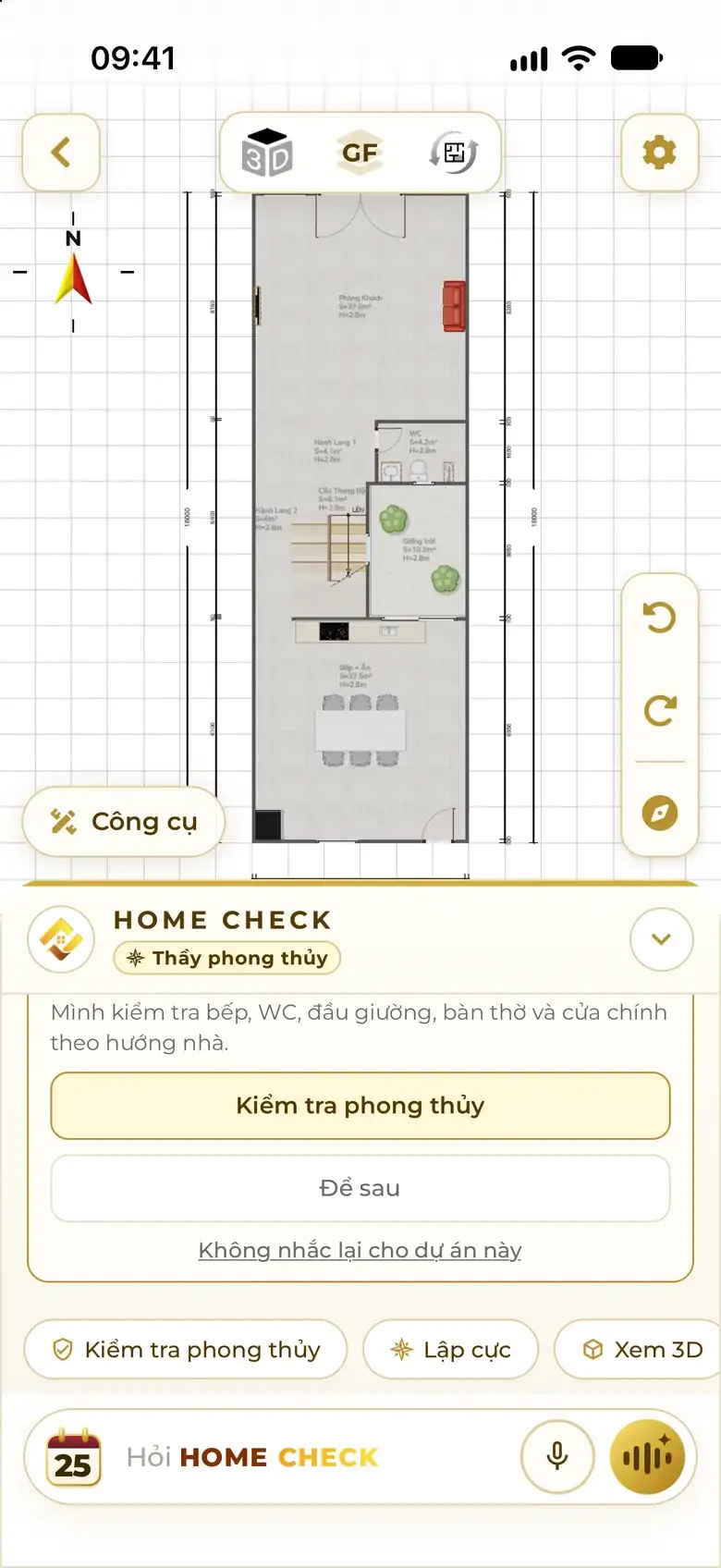
The app's chat screen: the user types one sentence; the Assistant draws the house, opens the plan editor, switches to the Feng Shui Master role and offers a feng shui check.

ChatType or speak

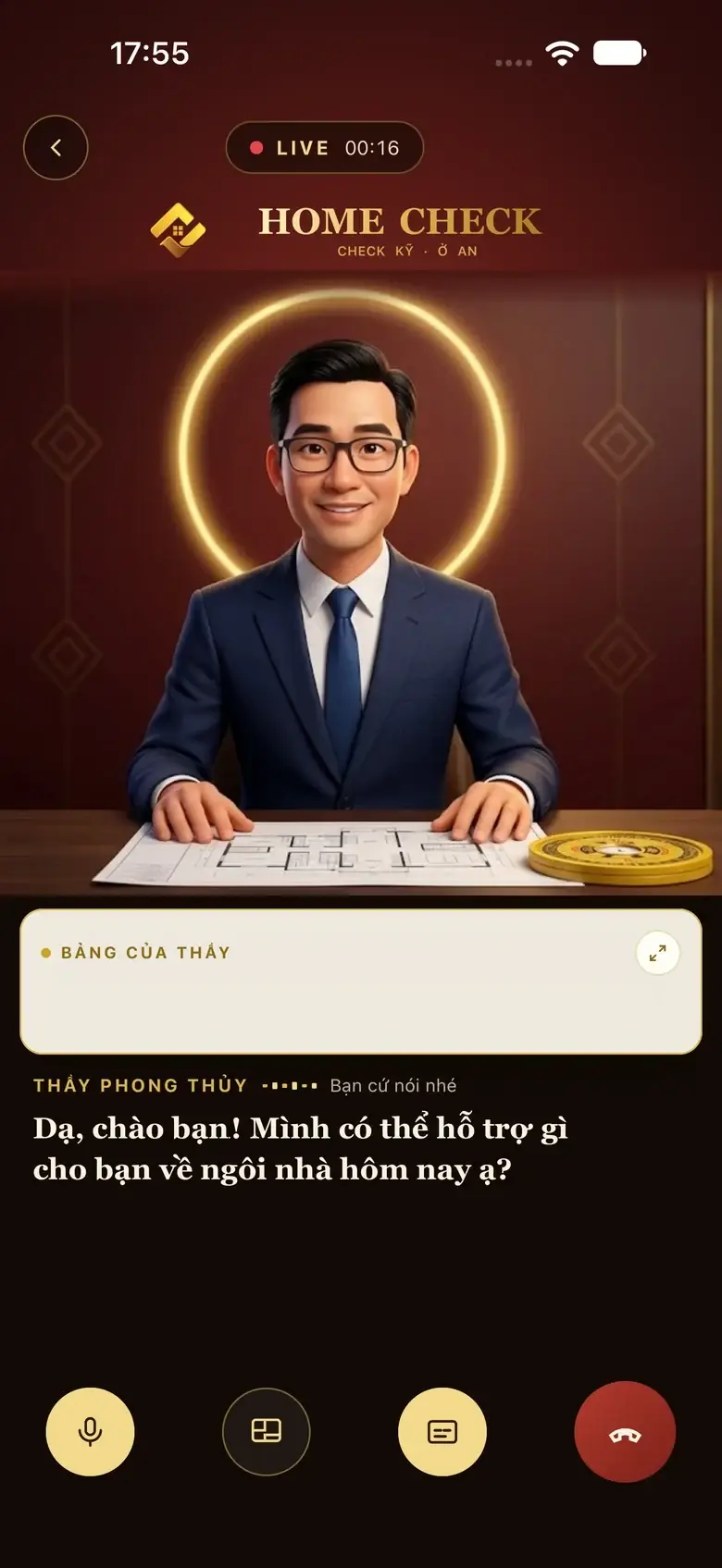
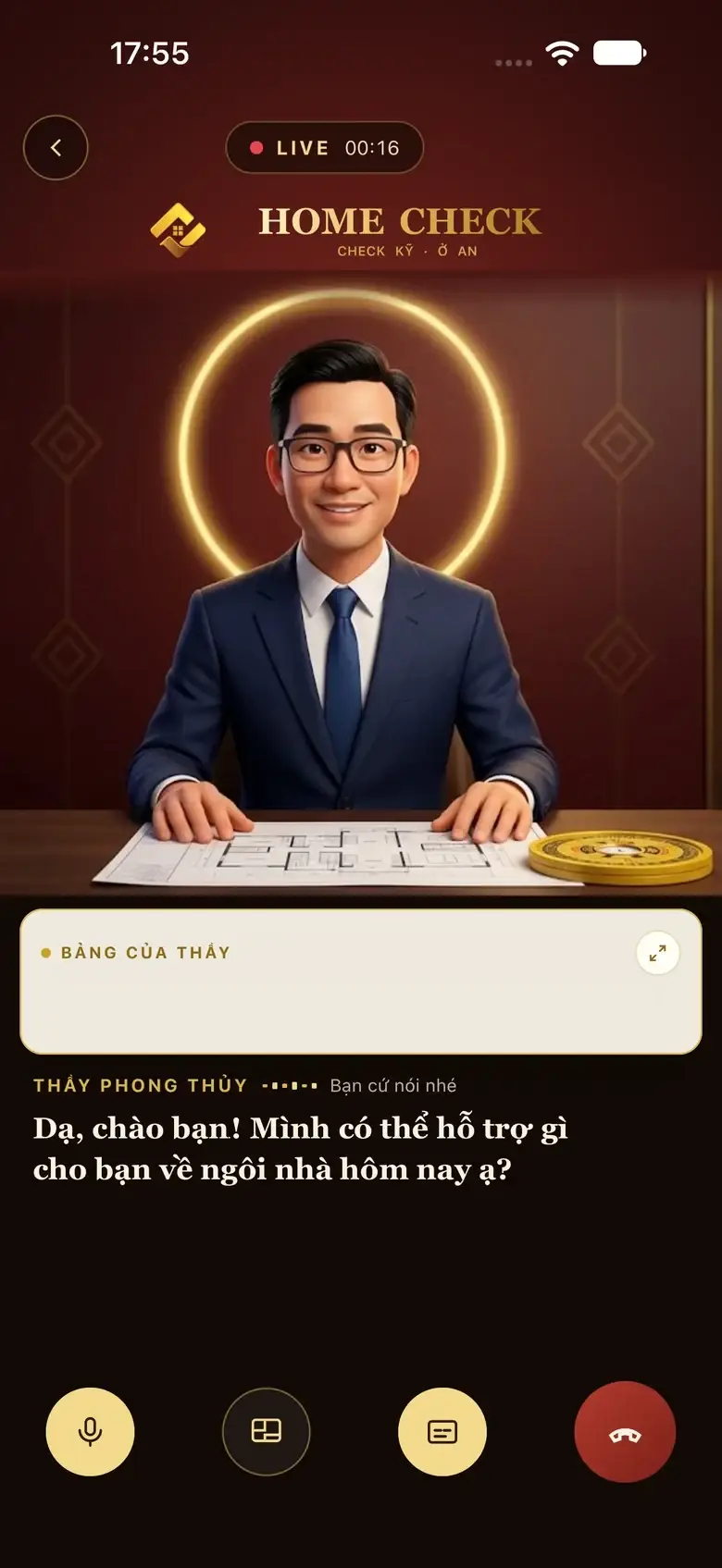
The app's Live screen: the AI feng shui master character seated at a desk in an office greets the user by voice, with subtitles below.

LiveTalk by voice

Real screenshots from the app

What is the Home Check Assistant?

  • 4 roles

    one assistant

  • 2 ways

    Chat · Live

  • Every screen

    has the Assistant

  • Each session

    reopens where you left

Two ways to talk

Message it like a real person. Or just talk.

Same assistant, same brain. Pick whichever suits the moment.

Chat

Type, or tap the mic to dictate
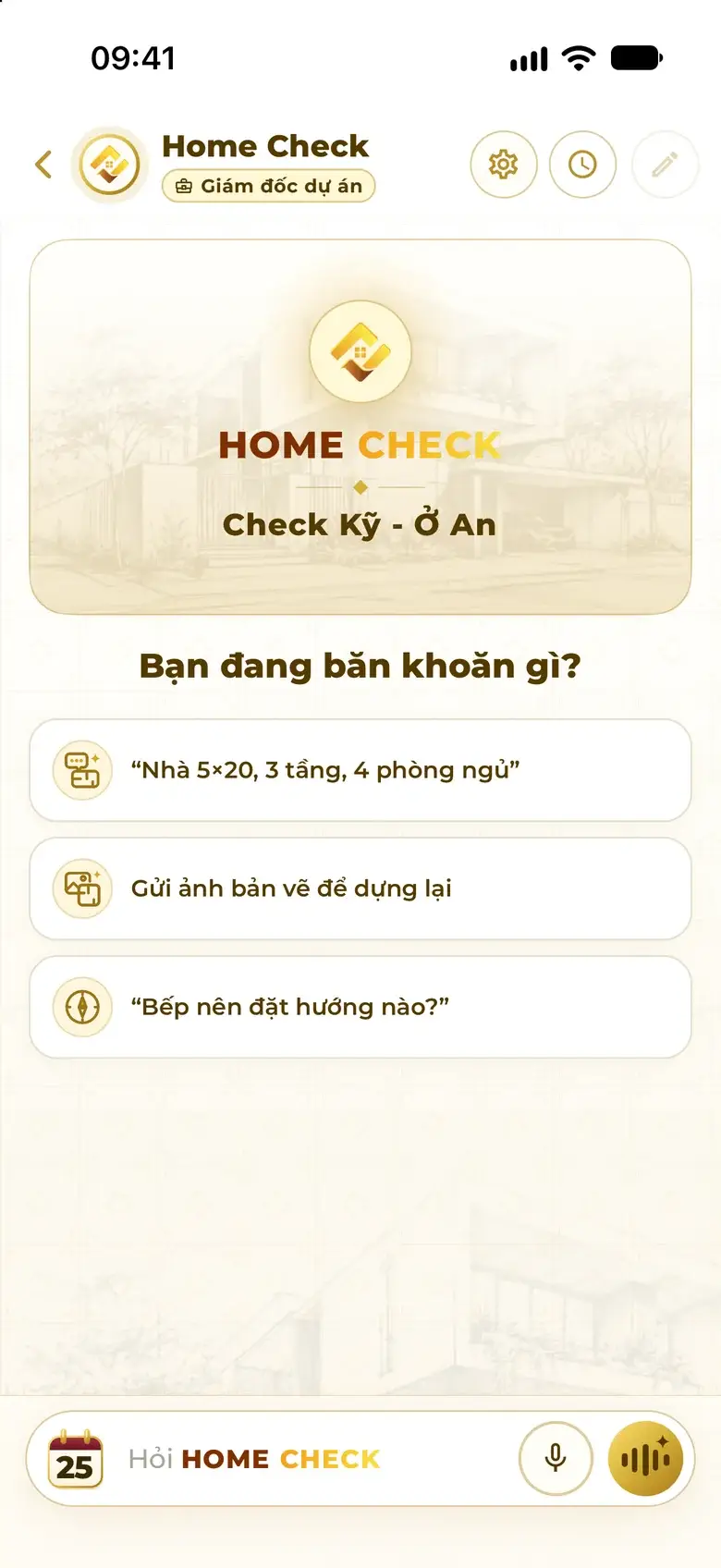
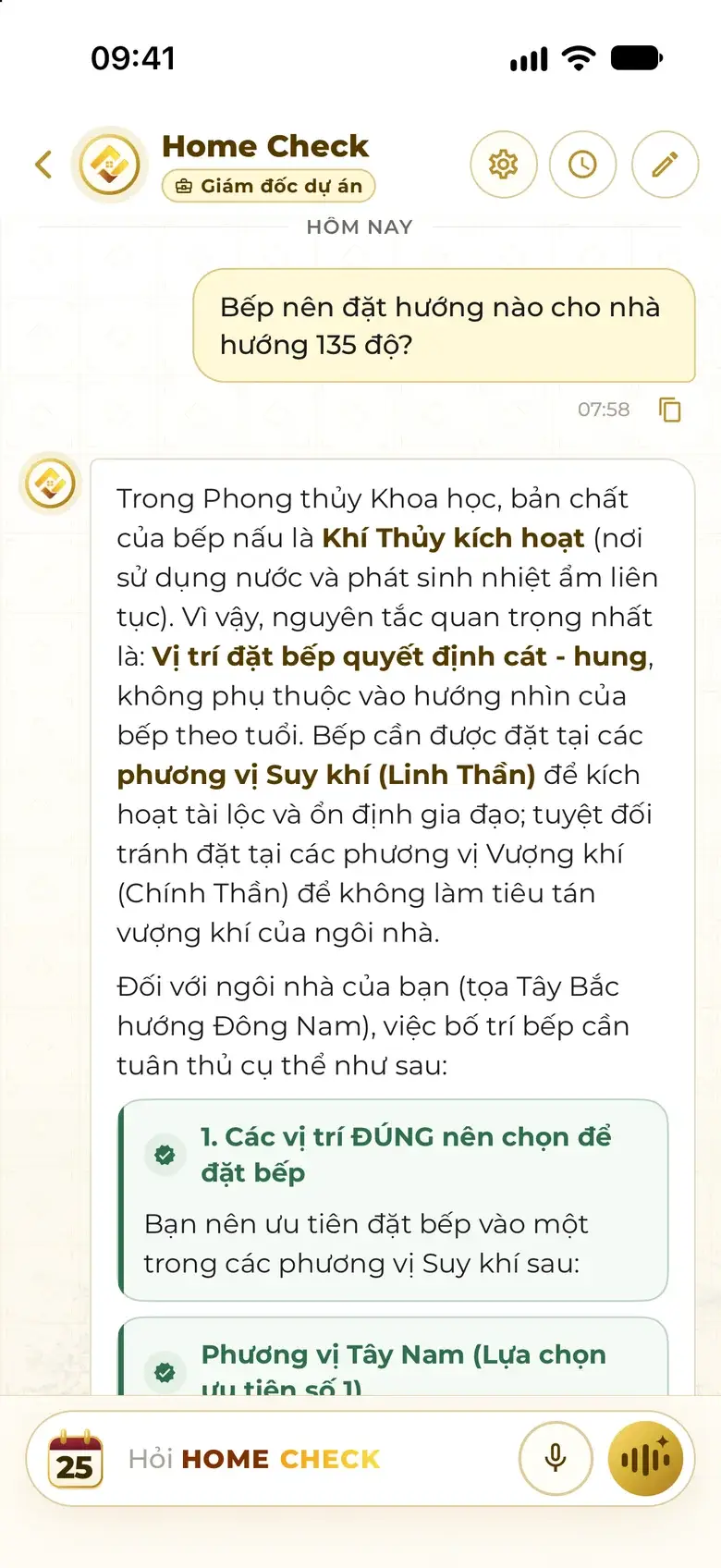
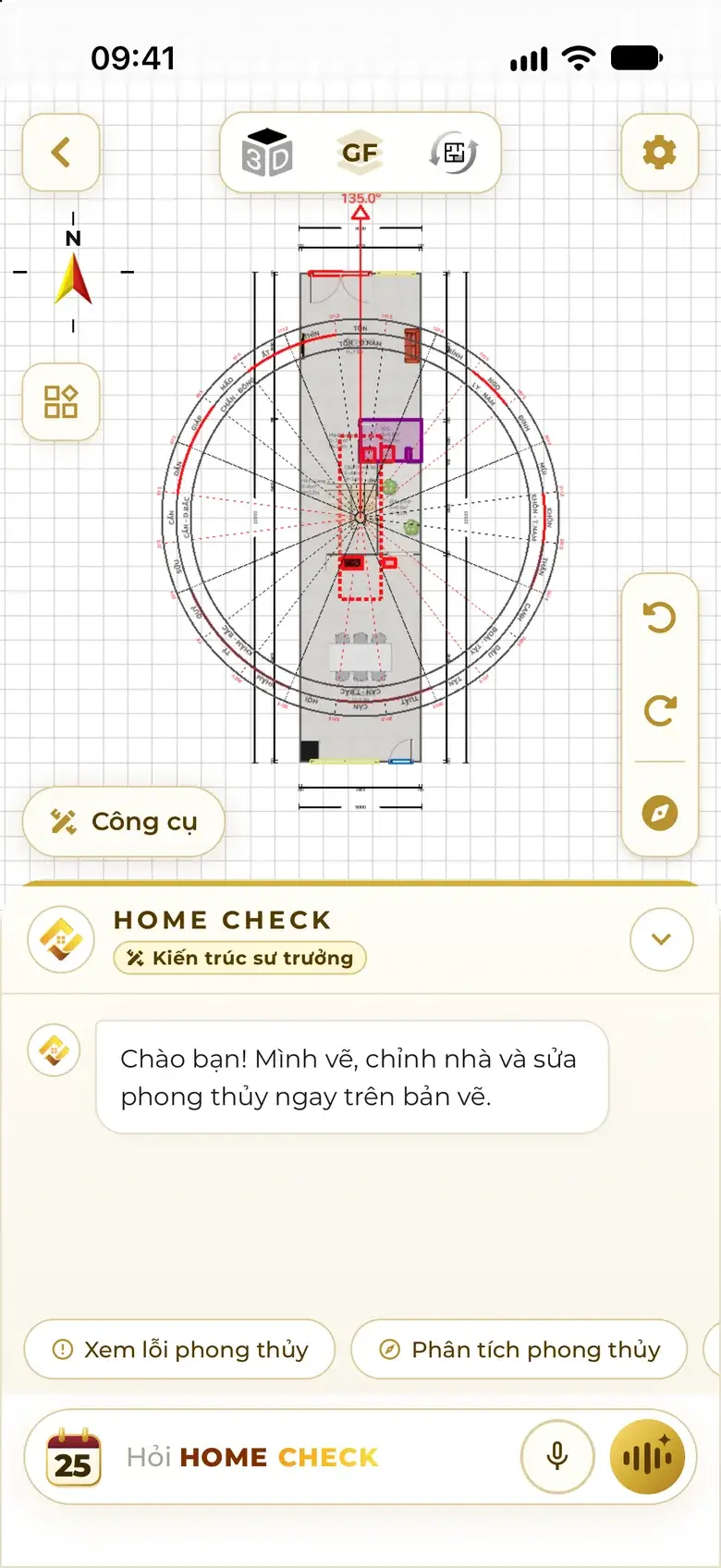
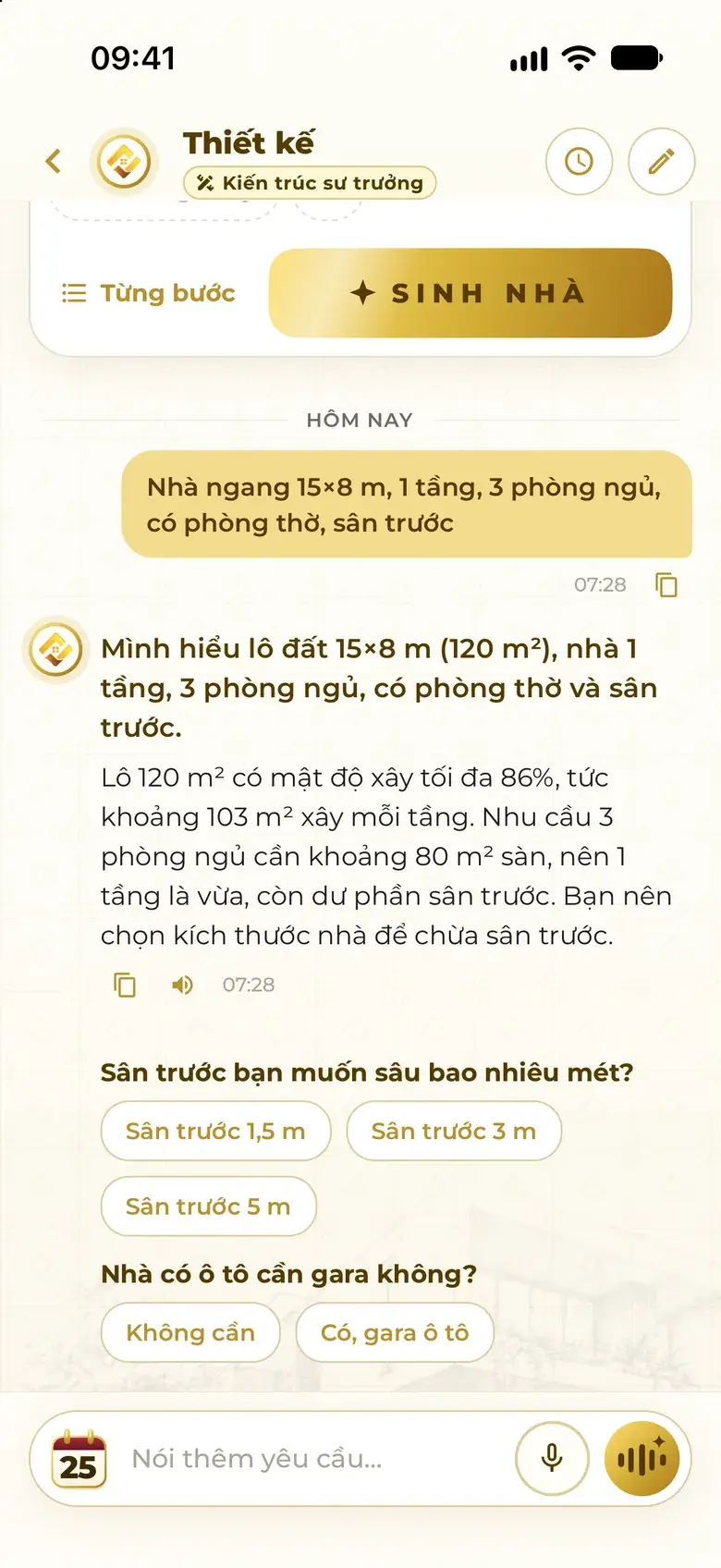
General chat: the prompt “What's on your mind?” and three quick suggestions — describe a house, send a plan photo, ask about feng shui. The Assistant answers where to put the kitchen in a house facing 135°: conclusion, recommended sectors, things to avoid. The Assistant inside the plan editor: a short greeting and context-aware suggestion chips such as View feng shui issues and Feng shui analysis. The Assistant as Lead Architect sums up the 15×8 m lot, works out the building density, then asks follow-ups with quick buttons: front-yard depth, garage or not.
  1. Ask anything
  2. Structured answers
  3. Context-aware chips
  4. Asks what's missing
  • Short words, many visualsScores, issues and options appear as cards; tap to act.
  • Context-aware chipsNever suggests what you just did; if there are issues, it offers a fix.
  • Copy · Read aloud · Like / DislikeEvery answer has its own time stamp and actions.
Live

No hands needed — speak and it listens

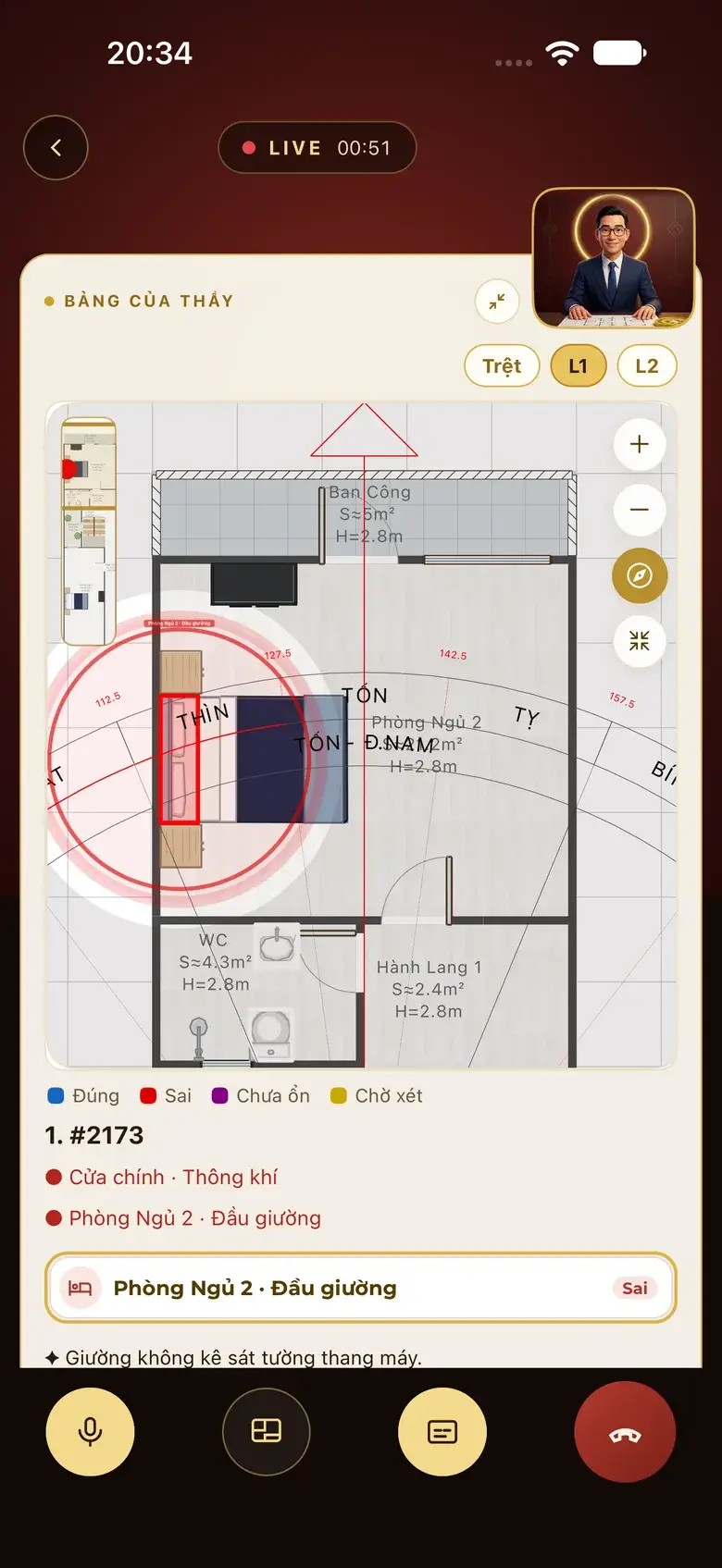
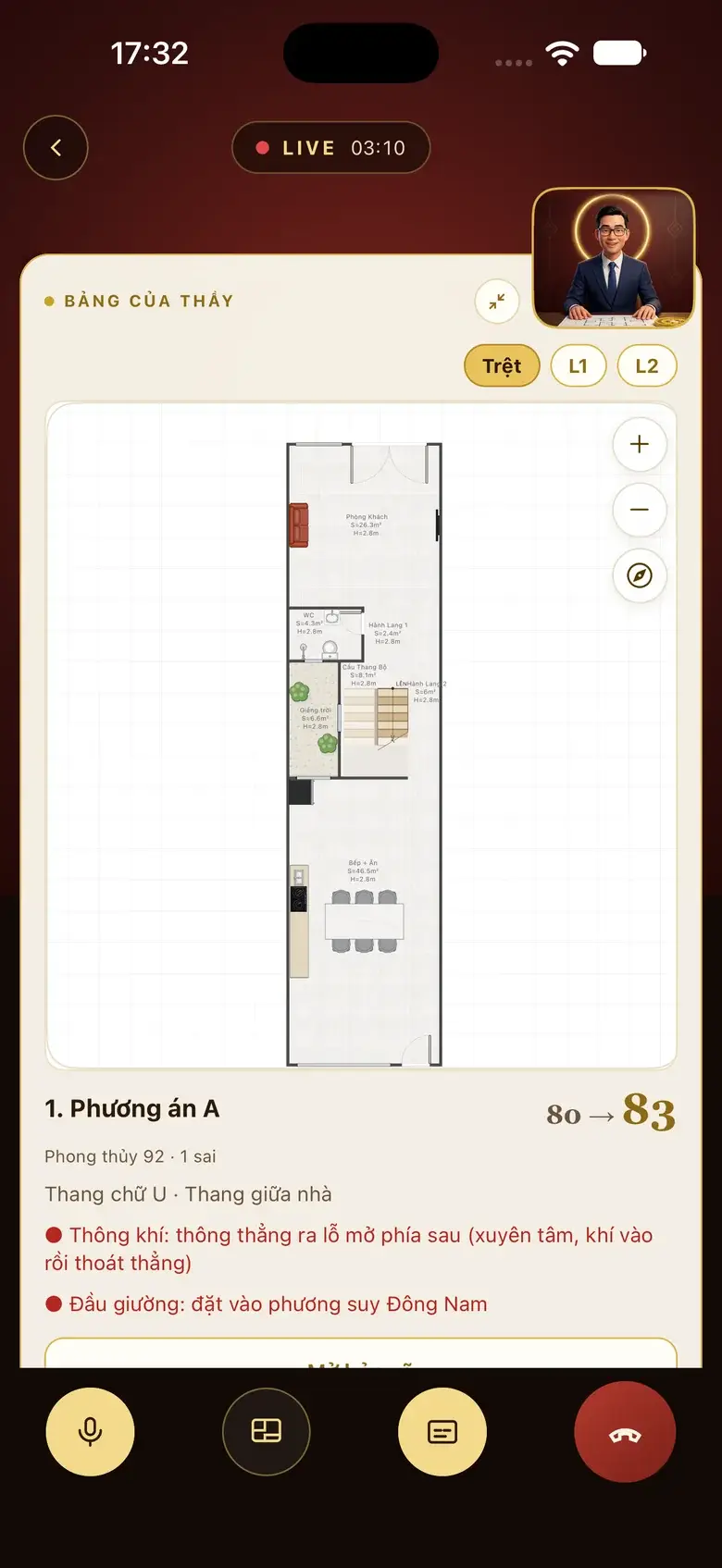
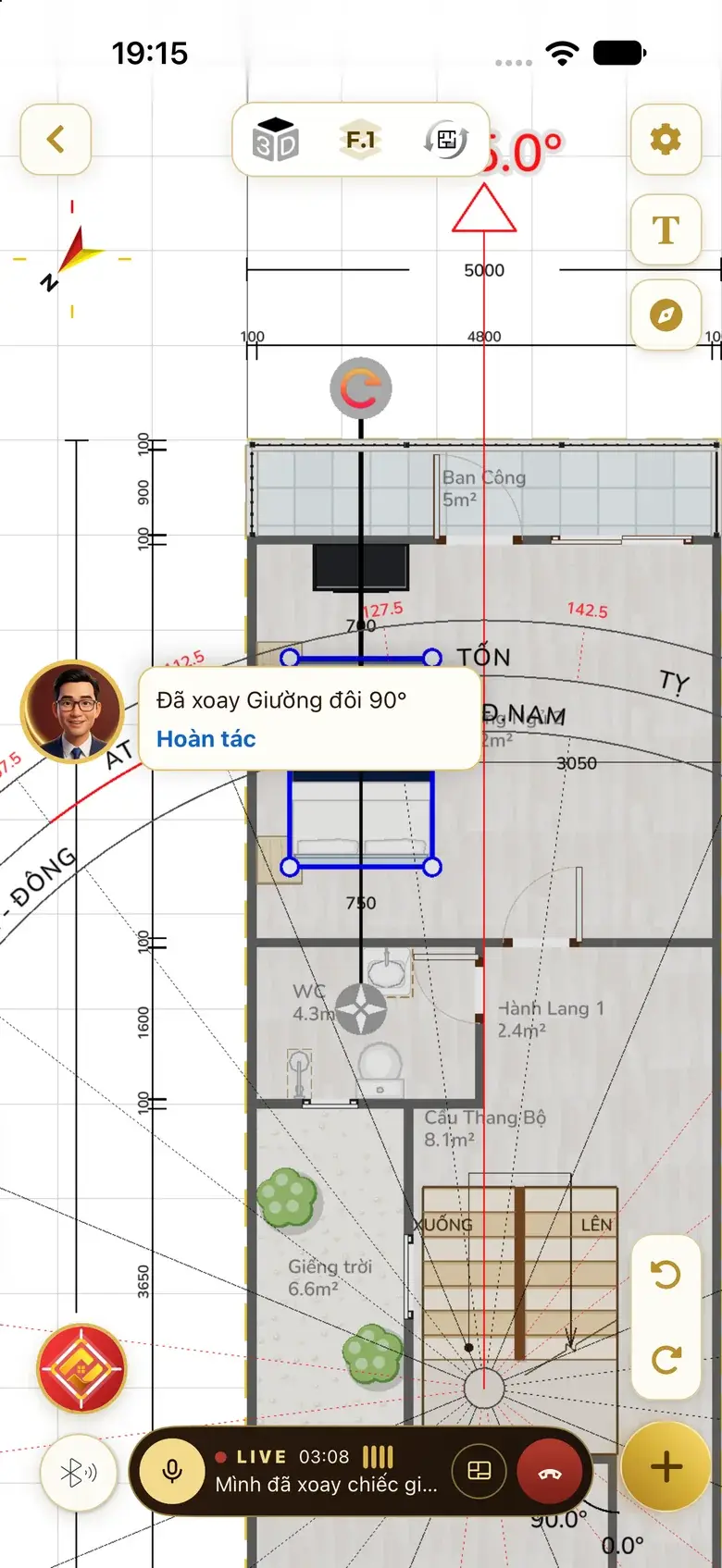
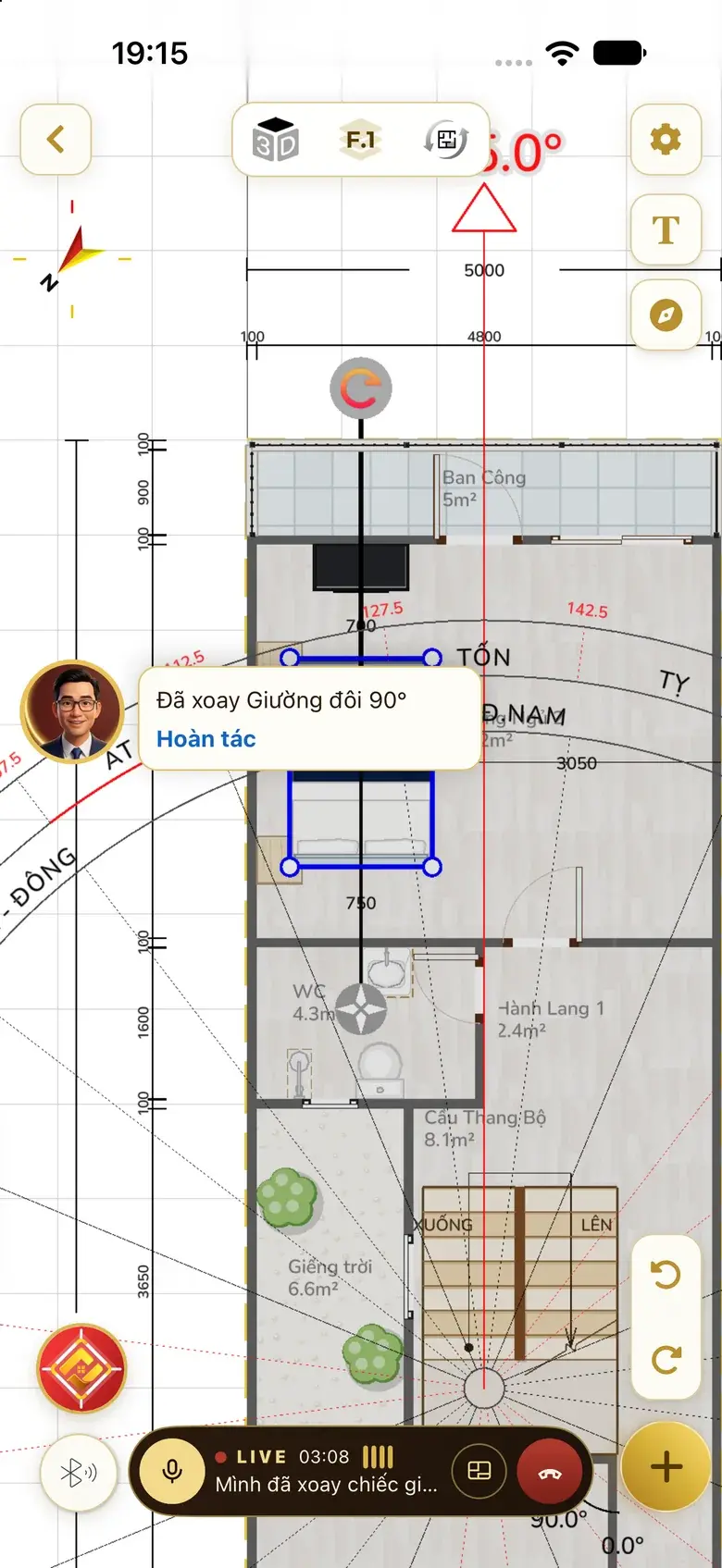
Live: the AI feng shui master character seated at a desk with a plan and a luopan greets the user: “How can I help with your home today?”. Live explains on the board: the real floor plan with the compass set, a red ring around the headboard issue, the character shrunk into the corner. Live after the user asks for an adjustment: option A redrawn, score up from 80 to 83, remaining issue listed below. Live inside the plan editor: the user asks to rotate the bed; the Assistant rotates the double bed 90° and shows an Undo button.
  1. Greeting
  2. Explains on the board
  3. Adjust and redraw
  4. Works on the plan
  • Speak naturally, interrupt any timeNo need to tap the mic for every sentence.
  • The master's boardPlan, compass, issues circled in red — right when it's talking about them.
  • SubtitlesIts words appear as text; when Live ends, the talk continues in the chat.

AI The feng shui master character is AI, not a real person.

One assistant, four roles

You say the task. It hands it to the right role.

No need to pick a role. The badge changes with the task — still one assistant that remembers the whole story.

Project Director

HOME CHECK

Project Director Lead Architect Digitization Engineer Feng Shui Master

  1. You: Draw me a 6×18 m townhouse, 3 floors, 4 bedrooms, with an altar room

  2. Project Director → Lead Architect · draw the 6×18 m house

  3. Design brief · 3 floors

    1. Shell
    2. Stairs
    3. Rooms
    4. Furniture
  4. Lead Architect → Feng Shui Master · check by house orientation

  5. Home Check · Feng Shui Master:

    I'll check the kitchen, WC, headboards, altar and main door against the house orientation.

    Check feng shuiLater

  6. Check feng shuiSet compassView 3D

Ask Home Check
  1. You say

    “Draw me a 6×18 m townhouse, 3 floors, 4 bedrooms, with an altar room.”

  2. The Assistant does

    • Hands it to the Lead Architect
    • Opens the plan editor
    • Switches to Feng Shui Master, offers a check
  3. Result

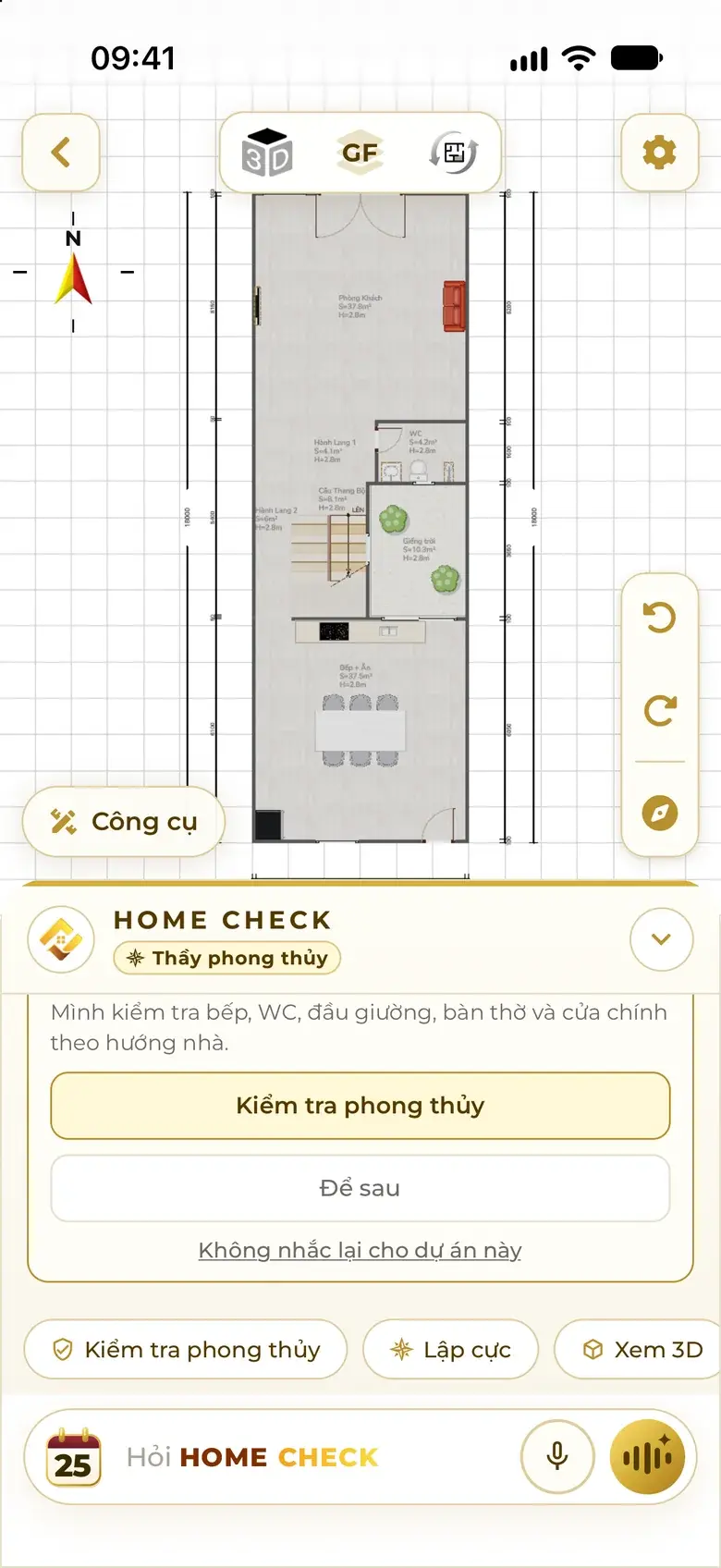
    A 3-floor plan, open and ready for a feng shui check.

Real app screen: after one sentence in the general chat, the 3-floor plan is open in the editor; the Assistant, now Feng Shui Master, offers a feng shui check.
Real screenshots from the app

Lead Architect

HOME CHECK

Project Director Lead Architect Digitization Engineer Feng Shui Master

  1. You: Wide house 15×8 m, 1 floor, 3 bedrooms, altar room, front yard

  2. Home Check · Lead Architect:

    Got it: a 15×8 m lot (120 m²), 1 floor, 3 bedrooms, an altar room and a front yard.

    How deep should the front yard be?

    1.5 m yard3 m yard5 m yard

  3. You: 3 m yard · No garage

  4. Home Check · Lead Architect:

    Noted: 3 m front yard, no garage.

    That leaves 5 m of depth — tight for 1 floor. Pick an option and I'll draw it.

    1 floor 15×5, 2 bedrooms2 floors 15×5, keep 3 bedrooms1 floor 15×8, no front yard

  5. You: 1 floor 15×8, no front yard

  6. Three options · wide house 15×8

    1. A96 pts
    2. B94 pts
    3. C94 pts

    View plan

Ask Home Check
  1. You say

    “Wide house 15×8 m, 1 floor, 3 bedrooms, altar room, front yard.”

  2. The Assistant does

    • Sums up what it understood
    • Asks follow-ups with quick buttons
    • Recalculates area, offers three choices
  3. Result

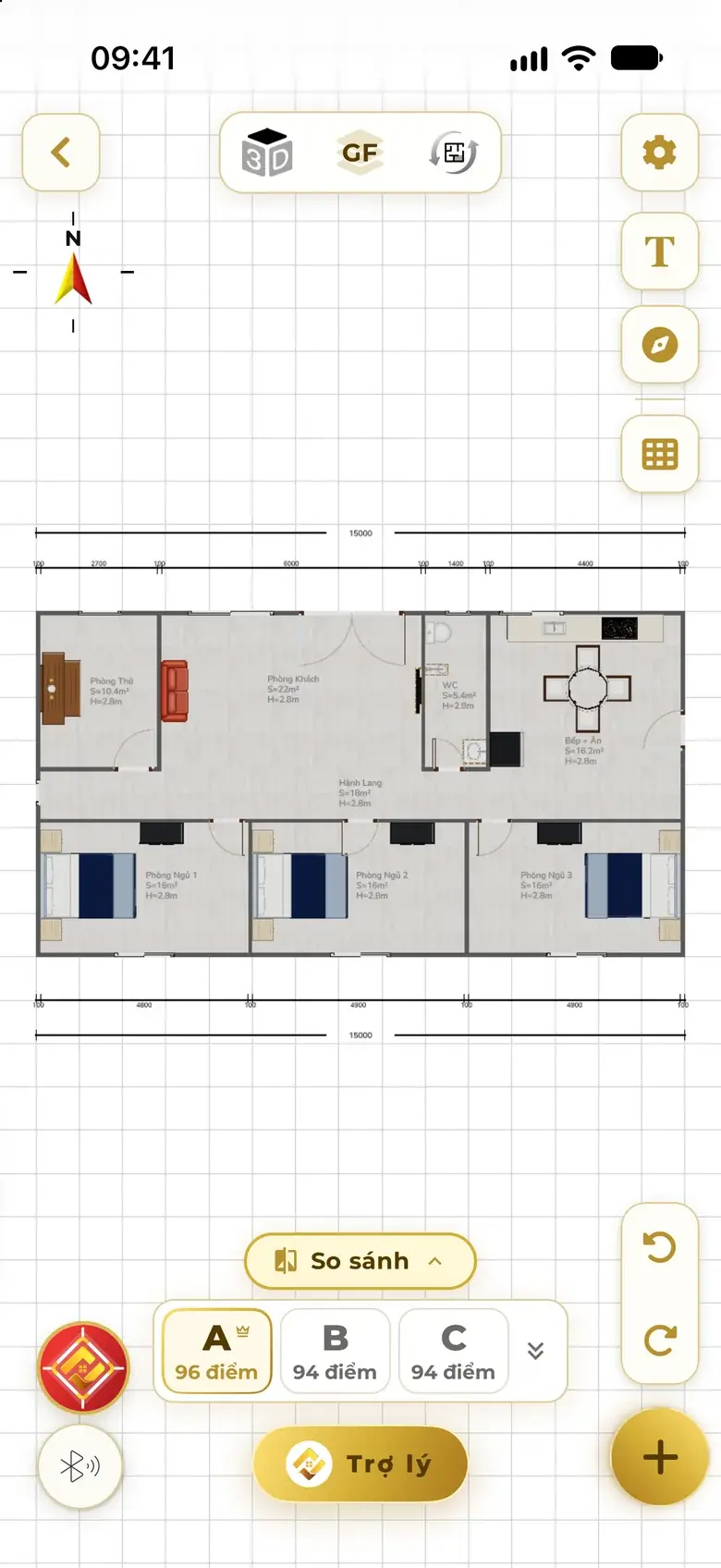
    Three wide-house options, A 96 · B 94 · C 94 points.

Real app screen: a one-floor 15×8 m wide house — altar room, living room, WC, kitchen-dining at the front, three bedrooms at the back; option strip A 96, B 94, C 94 points.
Real screenshots from the app

Digitization Engineer

HOME CHECK

Project Director Lead Architect Digitization Engineer Feng Shui Master

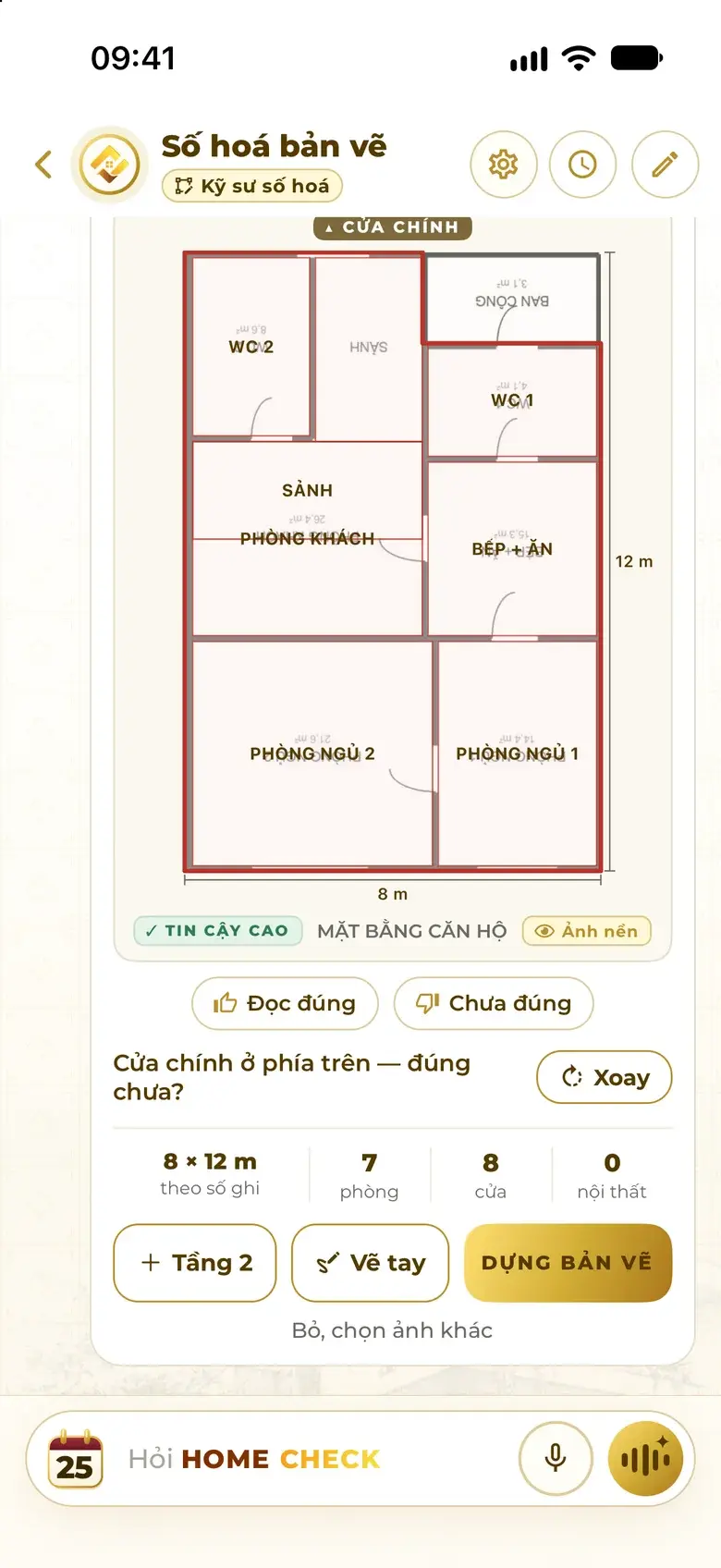
  1. You: Rebuild this plan for me

  2. Project Director → Digitization Engineer · build the plan from the photo

  3. ✓ High confidence

    from dimensions
    8 × 12 m
    rooms
    7
    doors
    8
  4. Home Check · Digitization Engineer:

    The main door is at the top — is that right?

    CorrectNot quite

  5. You: Correct

  6. Home Check · Digitization Engineer:

    Done — your digital plan is built. Open it to take a look.

    View plan

Ask Home Check
  1. You say

    Sends a floor-plan photo: “Rebuild this plan for me.”

  2. The Assistant does

    • Reads shell, rooms and doors from the dimensions
    • Double-checks the main door
    • Builds the digital plan
  3. Result

    8 × 12 m shell, 7 rooms, 8 doors — high confidence.

Real app screen: the Assistant as Digitization Engineer has read a floor-plan photo — 8 × 12 m shell from the written dimensions, 7 rooms, 8 doors, High confidence label, asking to confirm the main door.
Real screenshots from the app

Feng Shui Master

HOME CHECK

Project Director Lead Architect Digitization Engineer Feng Shui Master

  1. You: Set the compass for me, the house faces 135°

  2. Home Check · Feng Shui Master:

    Compass set at 135.0°

    Done. Next, let's check whether the house has any feng shui issues.

    Check feng shuiAnalysis

  3. You: Check feng shui

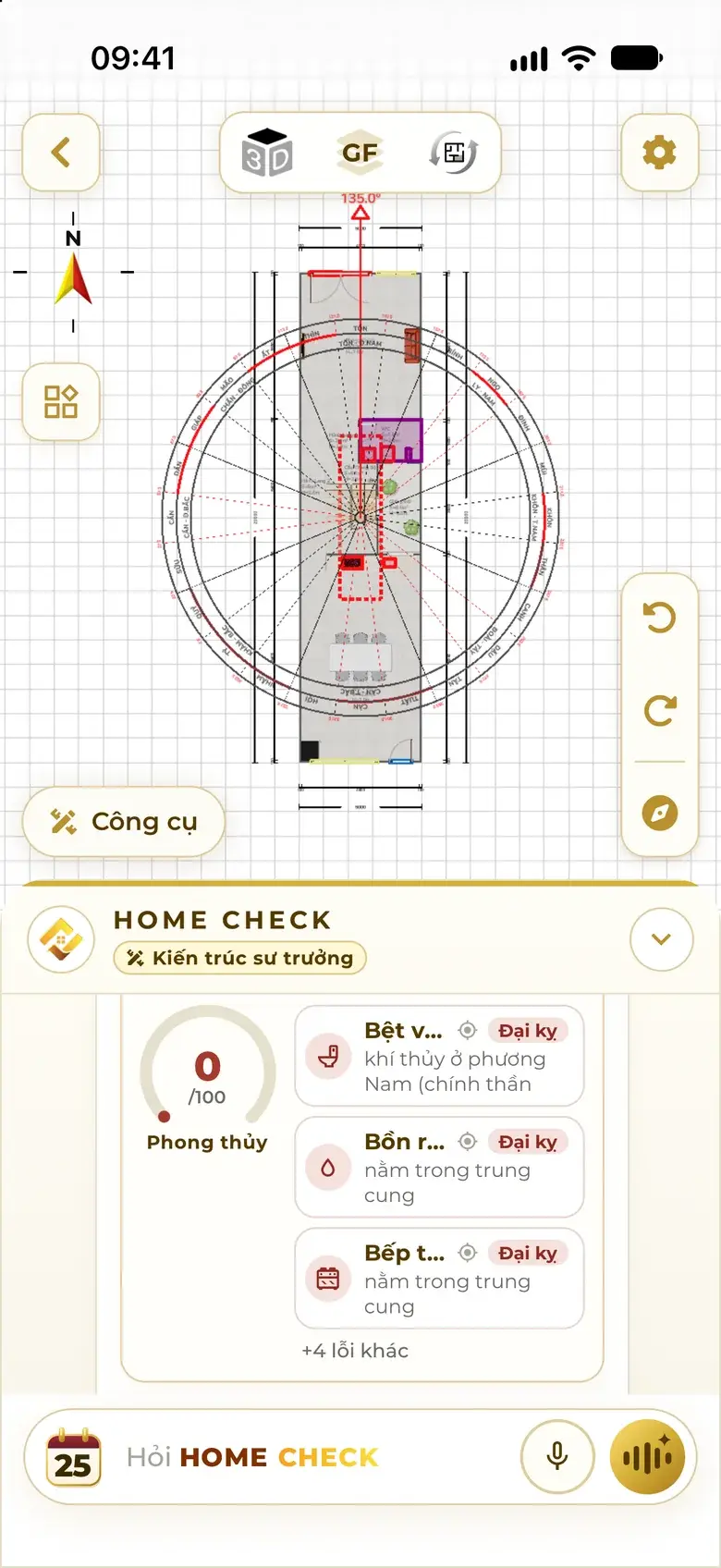
  4. 0/100

    Feng shui
    • WC toiletSeverewater qi in the South sector
    • SinkSeverein the center palace
    • StoveSeverein the center palace

    +4 more issues

    Fix issuesAnalysisView issues

  5. You: Fix issues, keep the layout

  6. Home Check · Feng Shui Master:

    Fixed: moved the WC toilet to the Southeast (weak) sector, backed by a solid wall; moved the sink along the kitchen counter.

    View plan

Ask Home Check
  1. You say

    “Set the compass for me, the house faces 135°.”

  2. The Assistant does

    • Sets the compass at 135.0°
    • Checks the whole floor, marks issues on the plan
    • Fixes issues, keeps the layout
  3. Result

    Each item is moved right on the plan, with every change listed.

Real app screen: the floor's feng shui card — a score out of 100 and severe issues such as the WC toilet in the South sector, sink and stove in the center palace; tap the locate icon to see each issue on the plan.
Real screenshots from the app

Illustration from real data Conversation rebuilt from real app screens. Real chats happen in the app.

It does the work — no button hunting

The Assistant holds the pen, right on your plan.

Say what you need — it calls the right app function directly, reports back when done, and Undo is always there.

  1. “Switch to floor 2”

    Switched the plan to floor 2

  2. “Rotate the bed 90°”

    Rotated the double bed 90° · Undo

  3. “Fix feng shui, keep the layout”

    Moved each item, changes listed

  4. “Add a floor”

    Added a new floor to the plan

  5. “Make this room the altar room”

    Room function changed

  6. “Let me walk through it in 3D”

    Opened the 3D walkthrough

  7. “Export a PDF”

    Exported the plan as PDF

Real app screen: Live inside the plan editor — the character in the corner reports “Rotated the double bed 90°” with an Undo button, the bed selected on the plan.
Real screenshots from the app

Pay for what you use

No confirmation at every step: when a task has a cost, tokens are deducted for exactly that task. If you run low, the Assistant tells you right in the chat.

See how tokens work

On every screen · remembers each session

Wherever you go, the Assistant comes along.

What it already knows, it never asks again: the degree measured with the Compass, the house location and family birth years travel with you to the next screen.

  1. Compass Measures 135.0°
  2. Design Draws to that direction
  3. Plan Sets the compass, no re-asking
  4. Feng shui Checks and fixes in place
  • On every screen

    Home, Design, Digitize, Compass, inside the plan — the Ask Home Check bar and the Live button are always there.

  • One session per screen

    Chat history is kept per task; reopen it and everything is exactly as you left it.

  • You choose what it remembers

    Remembering family and preferences is on only if you allow it; delete it any time.

Plain truth

The Home Check Assistant is an AI assistant.

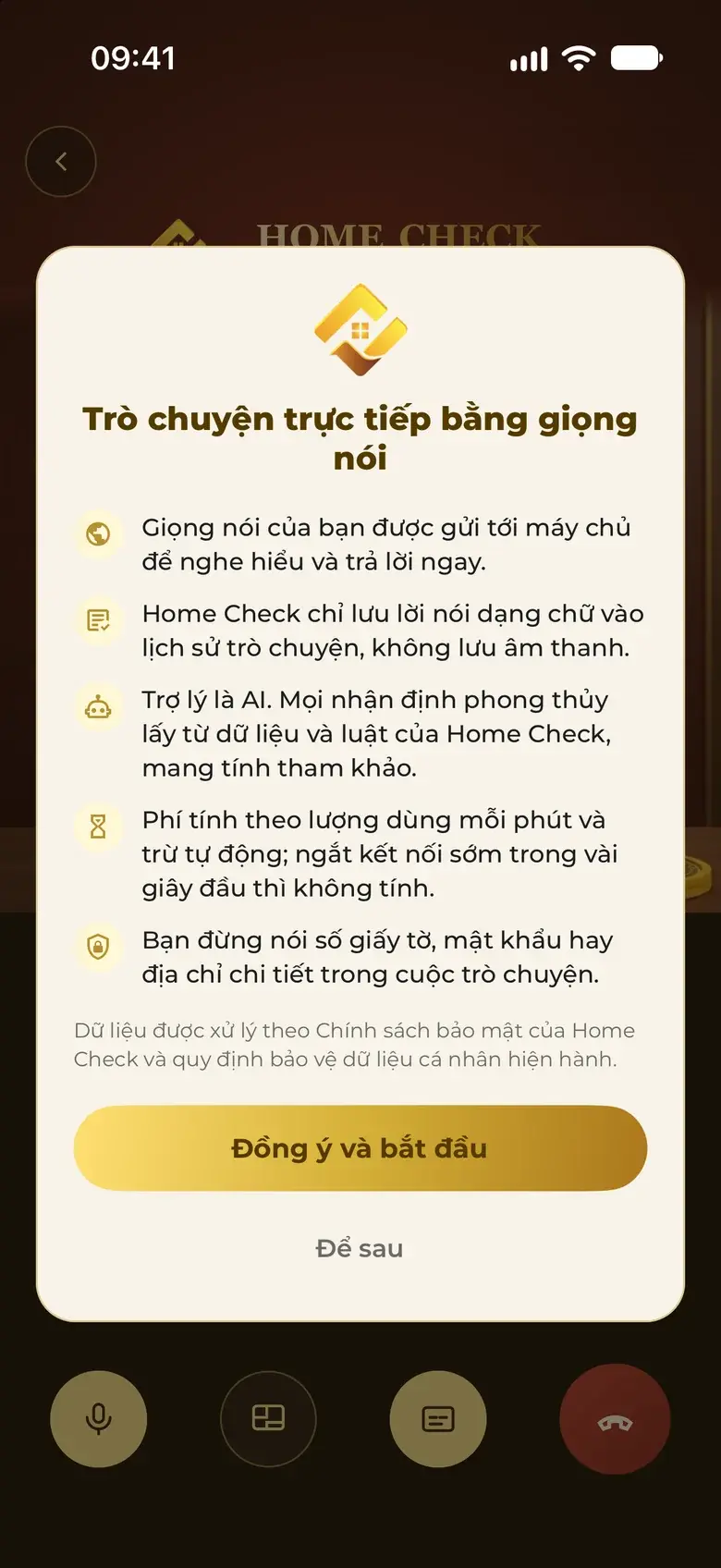
The app tells you so as soon as you start chatting, and asks for your consent before you begin.

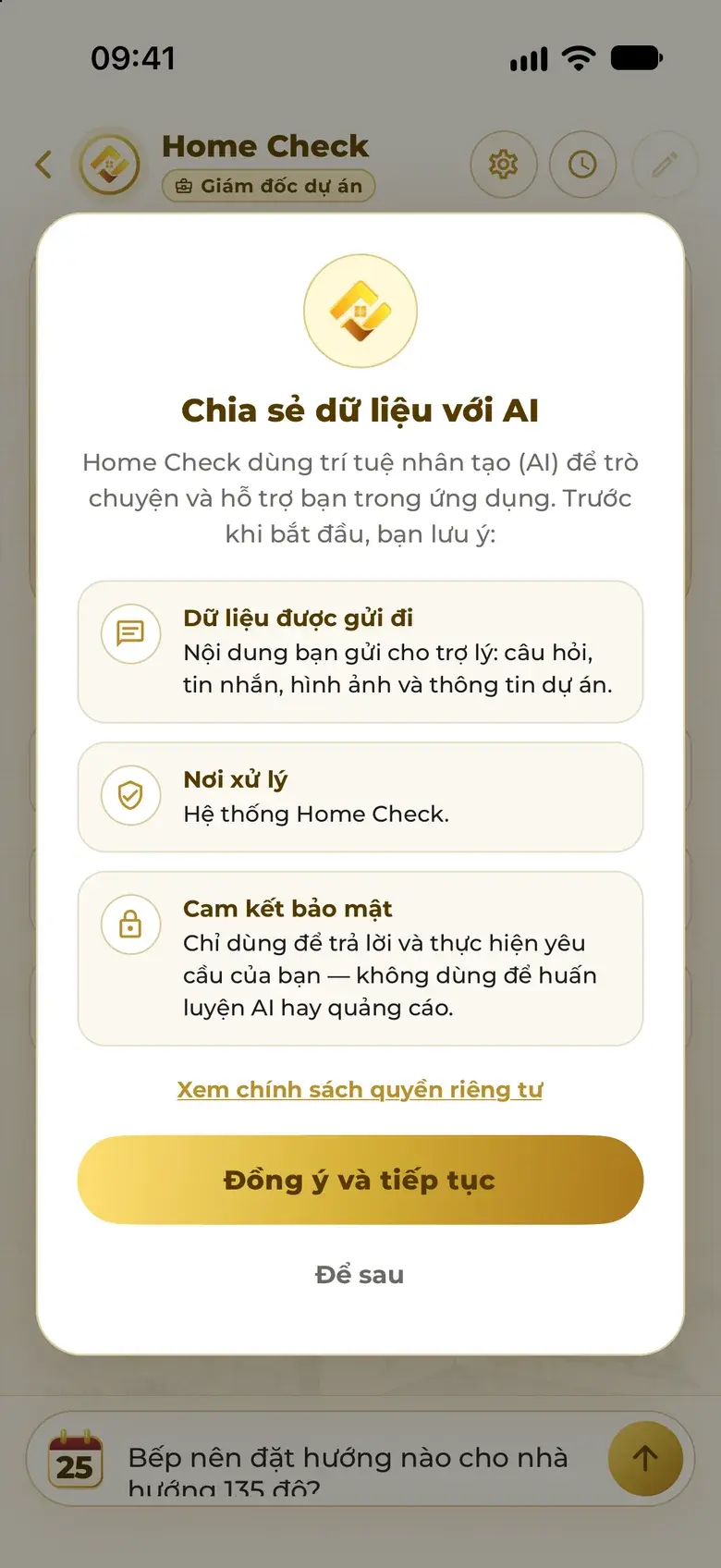
Real app screen: the “Share data with AI” box shown when you start chatting — what is sent, where it is processed, the commitment not to use it to train AI or for advertising.
Real app screen: the consent box before Live — voice is sent only to understand you, text is kept and audio is not, the assistant is AI.
  • What you send is used only to answer and do what you asked — not to train AI or for advertising.
  • Live keeps only a text transcript in your history, never the audio.
  • Every feng shui assessment comes from Home Check's data and rules, and is for reference.
  • Results are advisory; for projects that need formal appraisal, combine them with a site survey and a licensed architect.
How Home Check protects your data

Quick answers

Quick answers about the Home Check Assistant

What can the Home Check Assistant do?

Design three scored options, rebuild plans from photos, set the compass to the exact degree, check and fix feng shui, change room functions, add floors, open a 3D walkthrough, export PDFs and answer architecture and feng shui questions — all right on the plan, with undo.

How is Live different from Chat?

Live is a voice conversation you can interrupt, no hands needed: the AI feng shui master character talks while pointing on the board — plan, compass, issues circled in red — with subtitles. It can do the same tasks as text chat.

Is the character in Live a real person?

No. It is Home Check's AI character. The app states “The assistant is AI” before you start Live.

Do I need to know feng shui or architecture to ask?

No. Speak in plain words; the Assistant asks only for what's missing — the house's facing degree, the owner's birth year, how deep the front yard is — with quick buttons.

Does the Assistant remember our conversation?

Yes. Each screen keeps its own session history and reopens exactly as you left it. Facts it already has, such as the degree measured with the Compass, follow you to the next screen without re-asking.

How does the Assistant charge?

Pay for what you use, in tokens: when a task has a cost, tokens are deducted for exactly that task, with no confirmation at every step. If you run low, it tells you right in the chat.

Can I chat with the Assistant on the web?

Real conversations happen in the Home Check app on iPhone and Android. This page rebuilds conversations from real app screens so you can see how the Assistant works.

Meet the Home Check Assistant.

Download the app, sign in, and start with one sentence.

Scan with your phone to get Home Check.

Check well, live well

Get Home Check

Scan with your phone to get Home Check.

The code opens the right store for your phone.

or

Download on the App Store Get it on Google Play

More